Welcome to our community

Be apart of something great, join today!

whats a good scanner?

Disclaimer: Links on this page pointing to Amazon, eBay and other sites may include affiliate code. If you click them and make a purchase, we may earn a small commission.

michaelstepper

Well-known member
Joined
Jan 15, 2010
Messages
8,361
Reaction score
1,088
Location
southeast Alaska
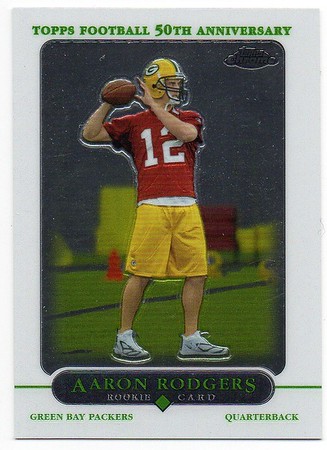
hey everyone, time to get back to scanning. I've been using my phone which takes great pictures but the lighting isn't consistent and the cards are always tilted slightly one way or the other.
I don't have anything slabbed so its my understanding that is a money saver. I dont need anything fancy but I dont want something that'll fall apart 800 scans from now. any suggestions?
 

flagshipchromecollector

Well-known member
Joined
Nov 25, 2009
Messages
2,421
Reaction score
35
Location
Birmingham, AL
I have an Epson ET-2250. Here's a typical scan for me:

2017ToppsContinuityProgramChrome1987SSRed-M.jpg
 

WCTYSON

Well-known member
Joined
Nov 3, 2014
Messages
7,364
Reaction score
171
I have a scanner and never bother to use it much because it can be so time consuming. Not sure what type of phone you have but if you can install the Office Lens free app, I recommend doing so. I have been extremely happy with the quality, flexibility and time consumed vs. using my scanner.
 

K34PuckettAddict

Well-known member
Joined
May 28, 2009
Messages
687
Reaction score
319

michaelstepper

Well-known member
Joined
Jan 15, 2010
Messages
8,361
Reaction score
1,088
Location
southeast Alaska

downloaded the app. it works great. my only criticism is if you have to move the corner boxes around it can get pretty tedious to do with your finger. maybe I need a stylus or something. Also having a consistent light source. I take pictures in natural light so no yellowing of the card and a scanner could give me that. (hard to do in AK right now as it's dark at 3:30 and I'm off at 3)
it's certainly a give or take and works great. still think a flatbed scanner would give me that bright white consistent light I'm looking for. Thanks for the suggestions.
 

petMonster

Member
Joined
Jan 20, 2012
Messages
549
Reaction score
6
I have an Epson ET-2250. Here's a typical scan for me:

2017ToppsContinuityProgramChrome1987SSRed-M.jpg

That's pretty awesome quality right there. I'd love to see what a 2012 Panini Prizm base looks like on your Epson. I'm also looking for a new scanner and the only cards that I ever have serious "ugly" problems with are the gray chrome cards or any cards that could pass for a rear-view mirror in my car had they not had an image printed on them.
 

petMonster

Member
Joined
Jan 20, 2012
Messages
549
Reaction score
6

The problem I have with phone pics is that I have to shoot chrome and mirror-like cards off-center, otherwise I see my or my phone's reflection in the card. But if I shoot off-center then the perspective gets all jacked up. For example, if you shoot from a high angle, then the top of the card looks wider than the bottom of the card (like a very subtle trapezoid), even though in reality the top and bottom are both the same width. None of the cropping tools I've used can handle this trapezoid effect.

Do you ever have that problem with the more minimal chrome cards (where there's a huge chunk of flat chrome NOT covered by Jose's image) or with mirror-like cards? If so, how do you handle it?

I've not tried cam scanner yet but I'm going to download it now and play around with it.
 

michaelstepper

Well-known member
Joined
Jan 15, 2010
Messages
8,361
Reaction score
1,088
Location
southeast Alaska
you can take a completely angled card and crop it straight. don't know how the app does it but it really does super well with any flat object.
 

flagshipchromecollector

Well-known member
Joined
Nov 25, 2009
Messages
2,421
Reaction score
35
Location
Birmingham, AL
That's pretty awesome quality right there. I'd love to see what a 2012 Panini Prizm base looks like on your Epson. I'm also looking for a new scanner and the only cards that I ever have serious "ugly" problems with are the gray chrome cards or any cards that could pass for a rear-view mirror in my car had they not had an image printed on them.

Here are a couple of samples of cards that are pretty flat. Scan about as well as you could hope for.

i-HzP6dV6-M.jpg
i-9Kt45dX-M.jpg
 

K34PuckettAddict

Well-known member
Joined
May 28, 2009
Messages
687
Reaction score
319
Here's a comparison between my scanner, which just may not be the best scanner for cards vs. the the cam scanner app.

HP Envy 7640 Scanner (again, probably not the best):
Scanner.jpg

Cam Scanner App:
17.145a.jpg

For what I want to do, I'll still with the Cam Scanner App from here on out and won't invest money into another scanner.
 

michaelstepper

Well-known member
Joined
Jan 15, 2010
Messages
8,361
Reaction score
1,088
Location
southeast Alaska
cam scanner app has worked great. It certainly has it's uses. I do prefer kirbyaddicts desktop scanner pic though.

fwiw I've redone all my 01, 09 and sweet sigs using the app. they turned out great I think.. but again I'm a stickler for lighting and that has been a frustration for myself.
 

Members online

Top