Welcome to our community

Be apart of something great, join today!

How to scan this for the PC?

Disclaimer: Links on this page pointing to Amazon, eBay and other sites may include affiliate code. If you click them and make a purchase, we may earn a small commission.

olerud363

Active member
Joined
Jun 14, 2010
Messages
3,213
Reaction score
16
Location
Ontario, Canada
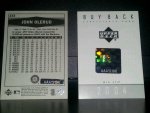
Recently purchased a 2004 SP Authentic Buyback Auto for my Olerud PC. It comes with a hologram sticker on the back of the card, plus a separate COA with a matching hologram sticker. I'm probably being OCD about it but I'm not sure how I'll scan it. Show the card front, and the COA instead of a back scan? Just the card front & back? Front & back of the card and COA?

I'm interested to hear what others have done for similiar cards.

Thanks.
1405113440764.jpg
 

MrMet

Well-known member
Joined
Apr 6, 2010
Messages
13,556
Reaction score
612
Location
The Poconos
You have an iPhone?
Get the app called PhotoCollage, they have all different templates for stuff. Take as many pics as you want and then photoCollage them together.
Here is an example of just some of the templates

ImageUploadedByFreedom Card Board1405120967.064703.jpg
 

LWMM

Well-known member
Joined
Feb 21, 2009
Messages
1,159
Reaction score
261
I'd scan the front and back of the card, and then scan the COA. Normally I'd just display the card, but if the occasion warranted, I would also be able to pull out a scan of the COA. It's no different than the number matched COAs that Topps issues with their Vault products, or even than the MLB Authentication stickers attached to items they sell. While your particular COA is the size of a standard baseball card, the reason for that was so that it could for in a pack along with the buyback card; it's an accompanying certificate, not a card itself.

With the following card, I'd normally display it as so:

05-42a.jpg~320x480
05-42b.jpg~320x480


If the occasion warranted (as it does now, or if I were asking a question or trying to sell it, say), I'd also display a scan of the COA:

05-42c.jpg~320x480


All that in one sentence: it's normally not necessary to display the COA, but it's nice to have a scan just in case.
 

Members online

Latest posts

Top