- Thread starter
- #1

You are using an out of date browser. It may not display this or other websites correctly.
You should upgrade or use an alternative browser.
You should upgrade or use an alternative browser.
best pic size for forum
- Thread starter 383astro
- Start date
Disclaimer: Links on this page pointing to Amazon, eBay and other sites may include affiliate code. If you click them and make a purchase, we may earn a small commission.

mrmopar
Member
- Jan 19, 2010
- 7,427
- 7,632
I like too see cards in real size or maybe slightly larger. I think those thumbnails you have to click to enlarge or the giant shots are too small/too large.
mmyers1978
New member
- Dec 24, 2013
- 414
- 0
I can never get mine right. I always have them either as thumbnails, or the giant scans. I'd like to get them to actual size, but I'm not quite sure how to do that.

gradedeflator
Active member
- Mar 31, 2011
- 1,389
- 20
I resize in photobucket and my non-slab scans are about 354x252 height and width
They are slightly smaller than actual size.
I guess i can experiment tomorrow and update this thread to at least provide measurements for folks
They are slightly smaller than actual size.
I guess i can experiment tomorrow and update this thread to at least provide measurements for folks

gracecollector
Well-known member
I scan all mine at 100%, 300 dpi, then resize to 72 dpi for web usage. Pixels should be 180x252 for a 2.5"x3.5" card. That's actual size of card.
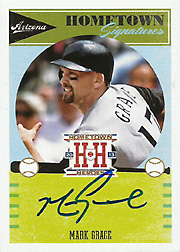

I just upload them and use the thumbnails that people can click on. That provides the best performance on the page as people only load the bigger pics if they want them. This also give a nice uniform size to the pics on the page. Reference my posts in the MT for what I mean.
gradedeflator
Active member
- Mar 31, 2011
- 1,389
- 20
[MENTION=1845]gracecollector[/MENTION], the pixel size you give looks small to me (looking at the Grace Hometown Hero as an example). What is the resolution of your screen?
mine is 1366x768, and my resized photobucket images of 354x252 are small to my eyes, but they are bigger than your image sizes. Just curious if the computer screen resolution is also a variable.
mine is 1366x768, and my resized photobucket images of 354x252 are small to my eyes, but they are bigger than your image sizes. Just curious if the computer screen resolution is also a variable.
gracecollector
Well-known member
Images optimized for the web are always 72 dots per inch. 72 x 2.5" = 180, 72 x 3.5" = 252. At 100% view, card should display at regular size. Of course, you may prefer a larger size. A 375x525 scan keeps the right aspect ratio, and gives a nice "larger" view.
Beckett's card gallery images are all standardized at 180x252.
If you are wanting to print your scans, 300 dpi is the general guideline. Pixels are then 750x1050.
Beckett's card gallery images are all standardized at 180x252.
If you are wanting to print your scans, 300 dpi is the general guideline. Pixels are then 750x1050.

Images optimized for the web are always 72 dots per inch. 72 x 2.5" = 180, 72 x 3.5" = 252. At 100% view, card should display at regular size. Of course, you may prefer a larger size. A 375x525 scan keeps the right aspect ratio, and gives a nice "larger" view.
Beckett's card gallery images are all standardized at 180x252.
If you are wanting to print your scans, 300 dpi is the general guideline. Pixels are then 750x1050.
72 PPI is a myth.
PPI doesn't matter when everyone has a different sized screen with different resolutions. You aren't going to get a 1:1 image unless you have a 72 PPI monitor.
The only benefit of having a 180x252 image is that it has a small file size. You are going to end up with a small, compressed image that lost a lot of detail.
On top of that, why would you want a 1:1 image. You probably sit around 2 feet from your monitor. Do you look at your baseball cards from 2 feet away?
Last edited:

ChasHawk
New member
I crop everything to 400x280 and my scans usually display pretty well I think
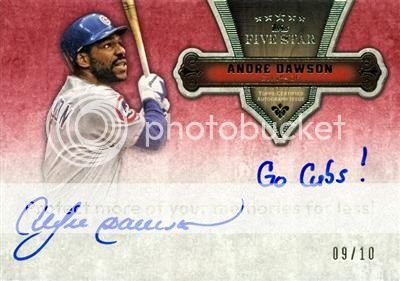
gracecollector
Well-known member
72 PPI is a myth.
PPI doesn't matter when everyone has a different sized screen with different resolutions. You aren't going to get a 1:1 image unless you have a 72 PPI monitor.
The only benefit of having a 180x252 image is that it has a small file size. You are going to end up with a small, compressed image that lost a lot of detail.
On top of that, why would you want a 1:1 image. You probably sit around 2 feet from your monitor. Do you look at your baseball cards from 2 feet away?
Well, 72dpi is definitely not a myth. It's been the web defacto standard for years. There is some migration to 96dpi monitors, but 72dpi is still the defacto standard.
http://www.vsellis.com/understanding-dpi-resolution-and-print-vs-web-images/
I want smaller sized photos for quicker loading on my tablet and phone, and webpages with lots of scans.
File size is all about what you are going to do with the image. No one standard is right. More important is consistancy in your scans for a nice presentation.
Well, 72dpi is definitely not a myth. It's been the web defacto standard for years. There is some migration to 96dpi monitors, but 72dpi is still the defacto standard.
http://www.vsellis.com/understanding-dpi-resolution-and-print-vs-web-images/
I want smaller sized photos for quicker loading on my tablet and phone, and webpages with lots of scans.
File size is all about what you are going to do with the image. No one standard is right. More important is consistancy in your scans for a nice presentation.
DPI doesn't mean much unless you are printing.
The actual size that someone will see is dependant on the users output resolution, and the resolution of their monitor.
Get it to look how you want on your monitor, because you can't know how it will display on others.
Last edited:
BunchOBull
Active member
I'm a 640x452 kinda guy.
gradedeflator
Active member
- Mar 31, 2011
- 1,389
- 20
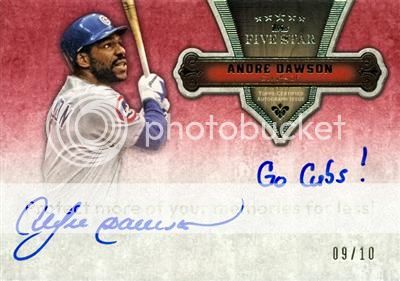
I like this size--slightly bigger than mine.
But my oh my the thought of re-uploading ALL of my images seems rather daunting. the easy way would be to resize "up" my current PB images, but i imagine they will look worse...
But my oh my the thought of re-uploading ALL of my images seems rather daunting. the easy way would be to resize "up" my current PB images, but i imagine they will look worse...
I crop everything to 400x280 and my scans usually display pretty well I think
- Thread starter
- #15
I like this size--slightly bigger than mine.
But my oh my the thought of re-uploading ALL of my images seems rather daunting. the easy way would be to resize "up" my current PB images, but i imagine they will look worse...
I am starting to scan my cards so I want to figure this out before I get too far in. I appreciate all the input guys. I didnt even think about all the different monitors. I was thinking of a standard size and it would just look the same on everyones screen, lol.


